Less bundling and minification in a C# ASP.NET MVC application
Bundling and minification are two great techniques for increasing the performance of a site. The basic idea is that resources of a similar type are grouped into a single file, which:
- reduces the number of requests (for what are typically quite small files),
- minifies,
- then compresses the resulting bundle.
This tecnique can be used for CSS, javascript, Less, Sass, and CoffeeScript.
A standard ASP.NET MVC project already includes a bundling framework for CSS and javascript via the NuGet Microsoft.AspNet.Web.Optimization framework package, but some work is required to include support for Less, Sass, and CoffeeScript.
This article is about adding support for Less, but I expect support for Sass, and CoffeeScript would follow a similar pattern.
A background and more in-depth discussion of bundling and minification on ASP.NET can be found at https://www.asp.net/mvc/overview/performance/bundling-and-minification. But whatever you do, do NOT use the DotLess NuGet package it suggests, as this doesn't support current versions of Less.
1. Install Less Transformer
Install NuGet package BundleTransformer.Less. This will install BundleTransformer.Core and JavaScriptEngineSwitcher.Core
You should read the post-install actions in the resulting NuGet read me in Visual Studio, but it boils down to you needing to install and select a javascript engine. As we are on a Microsoft stack, let's install the Microsoft javascript engine NuGet package JavaScriptEngineSwitcher.Msie.
You should check BundleConfig.RegisterBundles(BundleTable.Bundles); has been added to the Application_Start() method in Global.asax.
2. Install and Select Javascript Engine Switcher
To select the JavaScriptEngineSwitcher.Msie in web.config add the following to the /configuration/bundleTransformer/less/jsEngine section:
  <less>
    <jsEngine name="MsieJsEngine"></jsEngine>
  </less>
3. Configure
Configure the javascripts engine switcher in the using a file/class (App_Start/JsEngineSwitcherConfig.cs) will need to create
//using JavaScriptEngineSwitcher.ChakraCore;
using JavaScriptEngineSwitcher.Core;
//using JavaScriptEngineSwitcher.Jint;
//using JavaScriptEngineSwitcher.Jurassic;
using JavaScriptEngineSwitcher.Msie;
//using JavaScriptEngineSwitcher.V8;

namespace JavaScriptEngineSwitcher.Sample.AspNet4.Mvc4
{
    public class JsEngineSwitcherConfig
    {
        public static void Configure(JsEngineSwitcher engineSwitcher)
        {
            engineSwitcher.EngineFactories
                //.AddChakraCore()
                //.AddJint()
                //.AddJurassic()
                .AddMsie(new MsieSettings
                {
                    UseEcmaScript5Polyfill = true,
                    UseJson2Library = true
                })
                //.AddV8()
                ;

            engineSwitcher.DefaultEngineName = MsieJsEngine.EngineName;    //  ChakraCoreJsEngine.EngineName;
        }
    }
}
To actually implement these setting you should add JsEngineSwitcherConfig.Configure(JsEngineSwitcher.Instance); to the Application_Start() method in Global.asax.
Create a bundle
A style bundle is created by adding:
bundles.UseCdn = true;

var nullBuilder = new BundleTransformer.Core.Builders.NullBuilder();
var styleTransformer = new BundleTransformer.Core.Transformers.StyleTransformer();
var scriptTransformer = new BundleTransformer.Core.Transformers.ScriptTransformer();
var nullOrderer = new BundleTransformer.Core.Orderers.NullOrderer();

// Replace a default bundle resolver in order to the debugging HTTP-handler
// can use transformations of the corresponding bundle
BundleResolver.Current = new BundleTransformer.Core.Resolvers.CustomBundleResolver();

var commonStylesBundle = new Bundle("~/Bundles/CommonStyles");
commonStylesBundle.Include(
    "~/styles/file-1.less",
    "~/styles/file-2.less"
    );
commonStylesBundle.Builder = nullBuilder;
commonStylesBundle.Transforms.Add(styleTransformer);
commonStylesBundle.Orderer = nullOrderer;
bundles.Add(commonStylesBundle);
to the public static void RegisterBundles(BundleCollection bundles) method in BundleConfig.cs.
This will bundle ~/styles/file-1.less and ~/styles/file-2.less into a single resource that can be accessed via the usual @Styles.Render("~/Bundles/CommonStyles") syntax in your view. Minification and compression can be activated by ensuring <compilation debug="false" /> is set.
// ~/styles/file-1.less

body {
    background-color: tomato;

    .jumbotron h1 { color: lightcoral; }
}
and
// ~/styles/file-2.less

body {
     .container .jumbotron { background-color: lightgoldenrodyellow; }
}
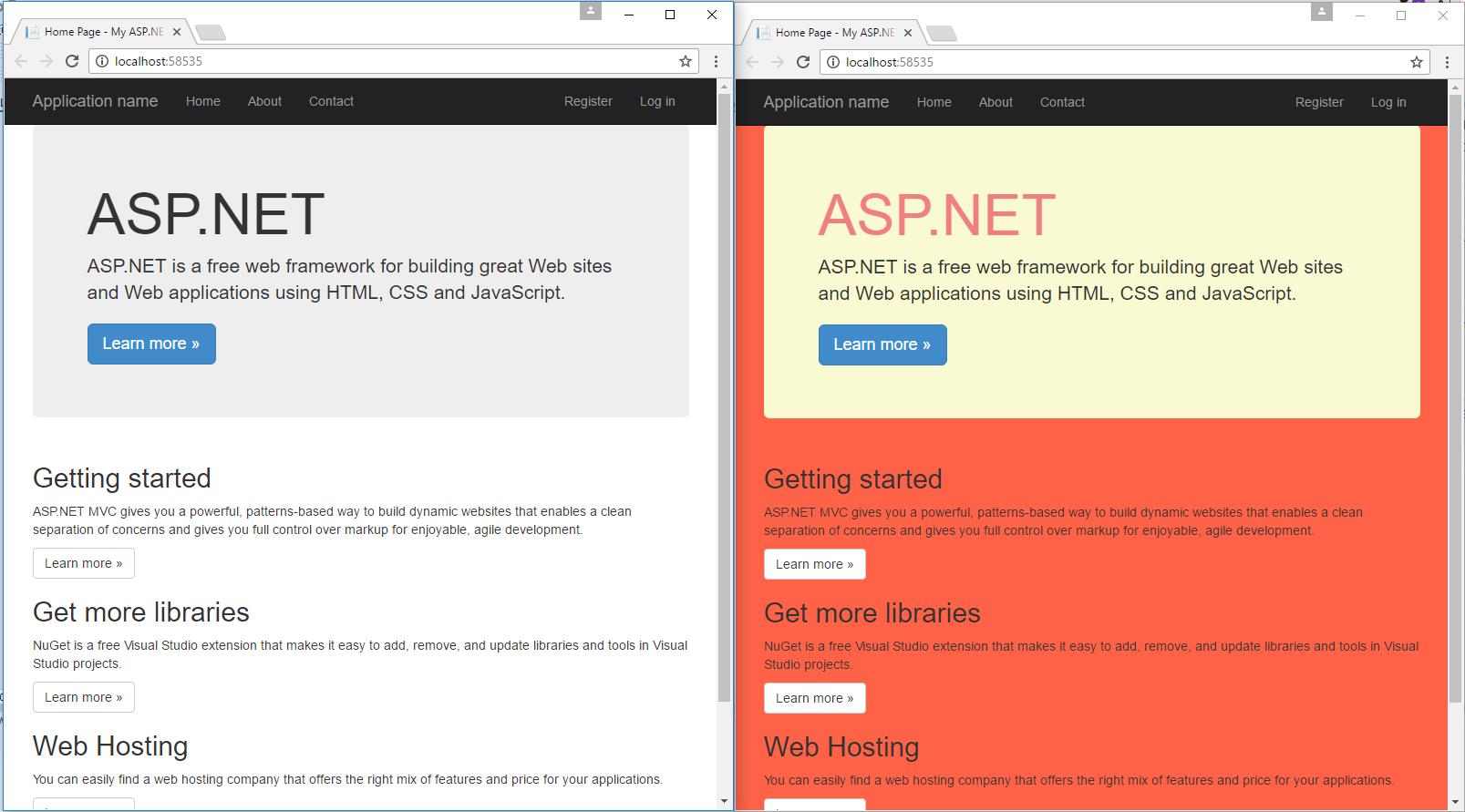
This bundle changes the default MVC home page as shown in the image below.